SimplyBook.me + Simply.com: Custom Domains Made Easy
 1727
1727 0
0 
This post is also available in:


You have built a booking website you are proud of. The services are set up, the calendar is humming, clients are booking. But the web address still looks a little generic. Wouldn’t it feel more like your business if the link carried your own name?
Now it can. Say hello to the new Simply.com domain integration inside SimplyBook.me.
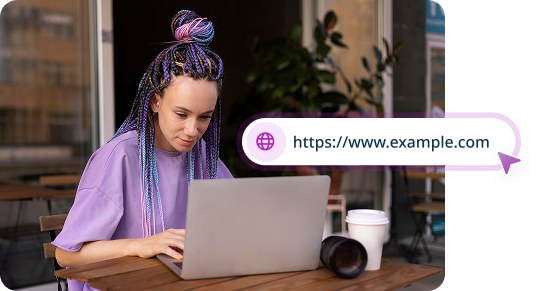
With it, you can buy a brand-new domain and connect it to your booking website in a few clicks, straight from your dashboard. No DNS settings to wrestle with. No SSL certificates to chase. No support tickets. You pick a name, complete the purchase, and your booking page goes live on its own address.
What is the Simply.com domain integration?
It is a new way to get your own web address for your SimplyBook.me booking website.
Until now, connecting a custom domain meant you already needed to own one and edit your DNS records by hand. That works fine if you are comfortable with A-records and IP addresses. For most business owners, though, it is a step too far into the technical weeds.
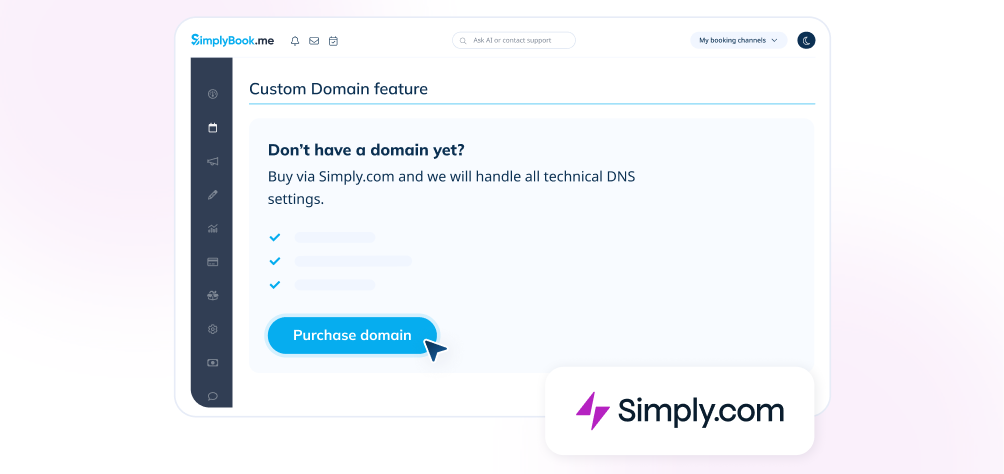
This integration removes that barrier. Right inside the Custom Domain feature, you will now see a “Purchase domain” button if you don’t have a domain yet. Click it, and SimplyBook.me sends you to Simply.com to buy one. Simply.com is a domain and hosting provider, and part of the team.blue group that SimplyBook.me also belongs to.
Once you finish the purchase, Simply.com tells SimplyBook.me automatically, and the new domain connects itself to your booking page. The DNS and SSL work happens quietly in the background.
What the integration does for you
Buy your domain without leaving your workflow
You start the whole process inside your SimplyBook.me dashboard. A click on “Purchase domain” opens Simply.com in a new tab, ready for you to search and choose a name. No hunting around for a separate registrar or copying settings between two systems.
Skip the DNS setup entirely
For new domains bought through Simply.com, the DNS records are configured for you. Simply.com points the domain to the right place and sends SimplyBook.me a confirmation. You don’t touch a single record.
Get an automatic SSL certificate
Your booking website needs to be secure, and visitors expect that little padlock in the address bar. The SSL certificate is issued automatically once your domain connects, so your page is protected from the start.
Go live, then get back to your clients
After the purchase, your domain links to your booking website on its own. You can take up to 24 hours for everything to be ready while DNS propagation completes and the SSL certificate is issued. After that, your booking page answers to its own name.
Why a custom domain is worth it
A web address is a small thing that does a lot of quiet work for your brand. Here is what your own domain gives you.
- A more professional first impression. A branded address looks credible the moment a client clicks it.
- A link clients actually remember. Your own name is far easier to recall and share than a generic booking link.
- A consistent brand everywhere. Your booking page lines up with your website, your social profiles, and your printed materials.
- A stronger online presence. A memorable, branded address makes your business easier to find and easier to trust.
How to get started
Getting your domain connected takes just a few steps, and none of them need technical knowledge.
- Log in to SimplyBook.me and open Custom Features from the main menu.
- Activate the Custom Domain feature. This is a one-time payment, which you can confirm in your account.
- Open the Custom Domain settings from the option on the right side of the feature.
- Click “Purchase domain.” This opens Simply.com in a new tab with your session ready to go.
- Search for and buy your domain on Simply.com. Pick the name and extension you like, then complete checkout.
- Let it connect on its own. Simply.com points the DNS to SimplyBook.me and sends a confirmation. Your status changes to Connected, and the SSL certificate is issued shortly after.
That’s it. Your domain can take up to 24 hours to go fully live while DNS settles in the background.
Already own a domain?
You can still use it. The Custom Domain feature also supports connecting a domain you already have. In that case you point an A-record to the IP address shown in the feature settings, then enter your domain name and save. The full steps for both options live in the Custom Domain help centre article.
Ready to give your booking page its own name?
A custom domain is one of the simplest ways to make your business look more established and easier to find. With the Simply.com integration, getting one no longer means learning how DNS works.
Activate the Custom Domain feature in your dashboard, click “Purchase domain,” and let SimplyBook.me and Simply.com handle the rest.
Don’t have a SimplyBook.me account yet? Create a free account and build a booking website worth putting your name on.

FAQ
No. When you buy a domain through Simply.com, the DNS records and SSL certificate are configured automatically in the background. You don’t need to touch any settings or understand how DNS works.
Your domain can take up to 24 hours to go live while DNS propagation completes and the SSL certificate is issued. In many cases it is ready sooner.
Yes. The Custom Domain feature is a one-time activation of €119. You can confirm the exact price in your account before you activate it.
Yes. The domain is a separate purchase handled by Simply.com. The price depends on the domain name and extension you choose.
Simply.com is a domain, hosting, and web services provider that helps businesses buy and manage domains online. It is part of the team.blue group, which SimplyBook.me also belongs to. In this integration, Simply.com handles the domain purchase and then connects the domain to your SimplyBook.me booking website.
Yes. If you already have a domain, the Custom Domain feature lets you connect it by pointing an A-record to the IP address shown in the feature settings, then entering your domain name and saving. The full steps are in the Custom Domain help centre article.

 Previous post


Comments
0 commentsNo comments yet