


This post is also available in:


Setting up a booking system used to mean clicking through menus, hunting for the right setting, and figuring out where everything lives. Not anymore. Say hello to Ask Simply — your built-in AI assistant inside SimplyBook.me that sets things up for you, simply by chatting.
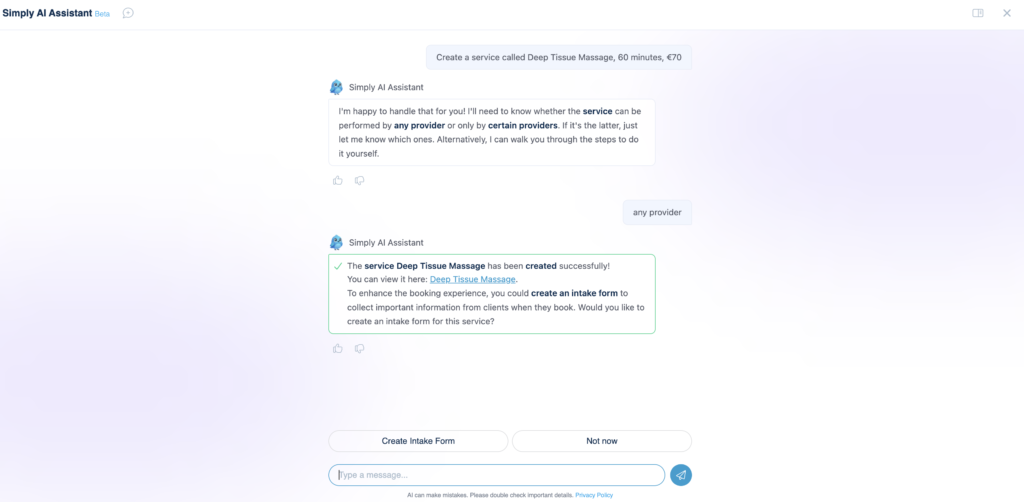
Think of Ask Simply as your own personal setup assistant. You describe what you want in plain, everyday language — “Create a service called Deep Tissue Massage, 60 minutes, €70” — and Ask Simply does the work behind the scenes. No tabs to dig through, no settings to memorise. Just tell it what you need.
Ask Simply is the latest release in SimplyBook.me’s growing AI suite. It joins tools like AI voice booking, which lets your clients book appointments simply by speaking — bringing the same natural, conversational experience to the people you serve. Together, they’re making running and growing your booking business more effortless than ever.
And the best part? Ask Simply is live for all users right now. Open your admin dashboard, start a chat, and try it today.

What is Ask Simply?
Ask Simply is a conversational assistant living inside your SimplyBook.me admin area. Instead of navigating settings manually, you have a back-and-forth conversation, and Ask Simply handles the setup as you go.
It’s a bit like having a knowledgeable team member sitting beside you. You explain what your business needs, and it builds it out, switches things on, and even pulls up your numbers when you ask. It remembers the flow of your conversation too, so you can say “now set its price to €45” and it knows exactly which service you mean.
It’s designed for you — the business owner, the receptionist, the manager — not for developers. If you can describe it, Ask Simply can usually do it.
What Ask Simply can set up for you
Here’s where it shines. Ask Simply can directly create and configure the core building blocks of your booking system — all from a simple chat.
Your services
This is the heart of your business, and Ask Simply handles it end to end. In plain language, you can ask it to:
- Create a new service and give it a name
- Add a description that appears on your booking page
- Set the price and the duration
- Build a weekly schedule, or set specific availability for special days
- Show or hide a service on your booking page
Your team
Adding the people who deliver your services is just as easy. Ask Simply can:
- Create a new service provider with their name, description, phone, and email
- Set how many clients a provider can see at the same time (great for group sessions)
- Build each provider’s weekly schedule and special-day availability
- Control whether a provider appears on your public booking page
Your opening hours and home page
- Set your company’s weekly opening hours and special-day exceptions
- Switch to a “special days only” schedule when you operate on selected dates
- Update the company description that welcomes visitors to your booking page
Powerful setups it handles for you
A few features are configured by Ask Simply from start to finish — not just switched on:
- Intake forms — describe the questions you need and Ask Simply builds the form fields for you
- Any Employee selector — let clients book the first available team member instead of choosing a specific person, with individual providers hidden automatically
- Multiple locations — set up and configure your locations in one go
- Service categories — organise your services into groups and assign them automatically
Switch on the features you want — in a few words
SimplyBook.me has a rich library of custom features, and Ask Simply can turn many of them on the moment you ask, then point you to the next step:
- Accept deposits and online payments
- Coupons and gift cards
- Loyalty points, memberships, and packages
- Waiting lists and group bookings
- Approve bookings before they’re confirmed
- Client rescheduling, daily reports, insights, and more
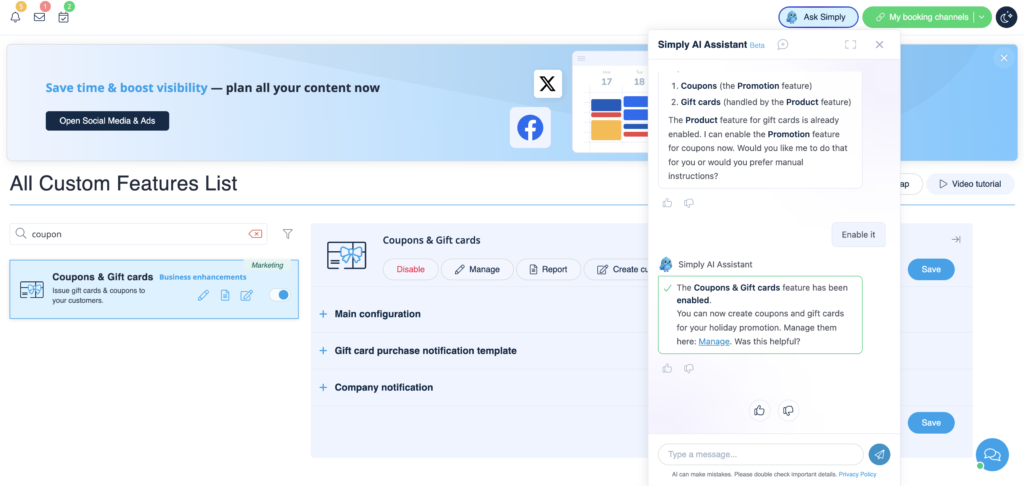
Want to run a holiday gift card promotion or start collecting deposits? Just ask, and it’s on.
Instant reports, right in the chat
This one’s a quiet favourite. Ask Simply can pull your business data into the conversation, using everyday language for dates. Try:
- “Show me appointments for this week”
- “How many new clients did we get this month?”
- “Sales by service for last week”
- “Show me transactions from last month”
You’ll get a clear summary — counts, revenue, top services, busiest providers — without ever leaving the chat or building a report by hand.

Why you’ll love using Ask Simply
- It sets things up for you. Less clicking, less searching, more done.
- It speaks your language. No jargon, no technical know-how required.
- It’s like having your own assistant. Describe the goal; it handles the steps.
- It keeps the context. Reference “that service” or “this provider” and it follows along.
- It guides you when needed. For settings it doesn’t change directly, it points you to exactly the right place — so you’re never stuck.
- It’s always available inside your admin, ready whenever you are.
How to talk to Ask Simply
There’s no special syntax to learn — but a few habits make the conversation smoother:
- Be specific. “Create a service called Gel Manicure, 45 minutes, €35” works better than “add a service.”
- One thing at a time, or several — your call. You can stack details into one request, or build up step by step.
- Use natural dates for reports. “This week,” “last month,” or a specific date range all work.
- Just ask if you’re unsure. If a request is ambiguous, Ask Simply will ask a quick clarifying question before changing anything — so nothing happens by surprise.

Example prompts by industry
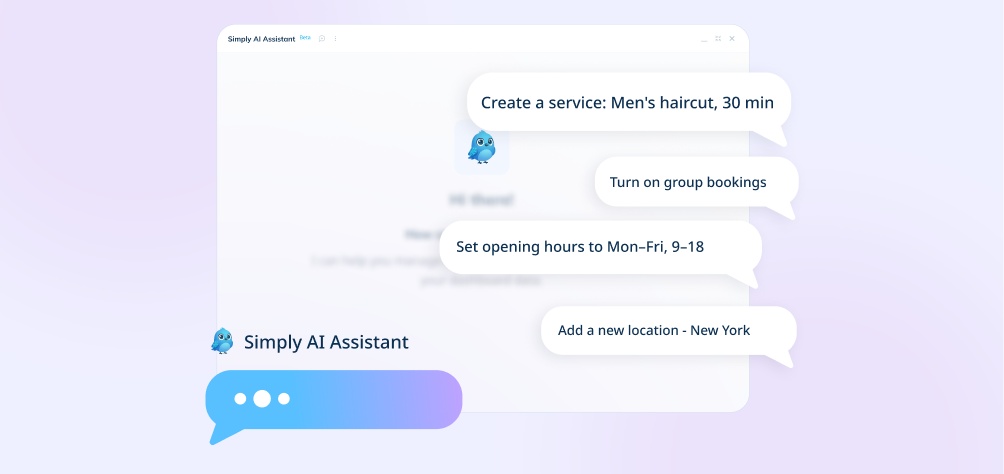
Every business is different, so here are starting points tailored to a few common ones. Copy them, tweak the details, and make them yours.
Salons & beauty
- “Create a service called Balayage, set the duration to 2 hours and the price to €120.”
- “Add a stylist named Maria who works Tuesday to Saturday, 9am to 6pm.”
- “Build an intake form asking about hair history, allergies, and preferred products.”
- “Turn on coupons and gift cards so we can run a holiday promotion.”
- “Hide individual stylists and let clients book the first available one.”
- “Show me all appointments for tomorrow.”
Health & medical clinics
- “Create a service called Initial Consultation, 45 minutes, €80.”
- “Add a practitioner called Dr. Owens with our clinic phone and email.”
- “Build an intake form that collects medical history, current medications, and insurance details.”
- “Set our opening hours to Monday to Friday, 8am to 5pm.”
- “Turn on appointment approval so the front desk confirms each booking.”
- “How many new clients did we get this month?”
Fitness & wellness
- “Create a session called Vinyasa Flow, 60 minutes, running Monday and Wednesday evenings.”
- “Add a trainer named Sam who can take up to 10 clients at the same time.”
- “Turn on the waiting list so members can join when a class is full.”
- “Switch on group bookings so friends can sign up together.”
- “Enable packages so I can offer a 10-class pass.”
- “Show me last month’s sales by service.”

Ready to try it?
Ask Simply is available to all SimplyBook.me users today. There’s nothing to install and nothing to configure first — just open your admin dashboard, start a conversation, and tell it what you’d like to set up. And remember, if you get stuck, have a question Ask Simply cannot answer, or just want to talk to a real person, the live chat support team is available directly inside your SimplyBook.me account.
The fastest way to learn what it can do is to try it. Start with a service, ask for a report, or switch on a feature you’ve been meaning to explore. Ask Simply takes it from there.
Have a question for it? Just ask, simply.